Deutsch
 English
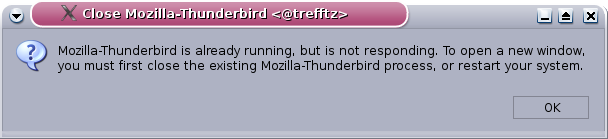
Possible cause
At startup, the program creates so-called lock files. These prevent Thunderbird from being started more than once under the same user. When the mail program is closed normally, the files are deleted. If the program crashes, the files are still there.
Solution
Step 1
If you currently have one of the browsers "Mozilla Firefox" or "Mozilla" open, please close it.
Step 2
Open a text console or a terminal, which can be found under KDE under Start Menu > Utilities > Terminal. Enter all the following commands in the terminal.
Step 3
Check whether "Thunderbird" processes are still running on your computer by entering the following commands and kill them:
- ps -A | egrep "thunderbird|run-mozilla.sh"
- kill -9 process numbers
Note: If no process numbers are displayed after entering the ps command above, the kill command is not necessary.
There should now be no more "Thunderbird" processes running on your computer.
Step 4
The lock files must be deleted manually by the user. The following procedure is recommended:
- Change to the directory in which the Thunderbird configuration files are located:
- cd ~
- cd .mozilla-thunderbird (on some systems: cd .thunderbird)
- ls
- A directory name consisting of a combination of numbers and letters is displayed. This directory name is to be used in the following cd command.
- cd Combination of numbers and letters
- cd Combination of numbers and letters
- Delete the files lock and .parentlock. Note the dot before the second file name, i.e.
- rm lock
- rm .parentlock
Now you can close the console again and Thunderbird should start as usual.
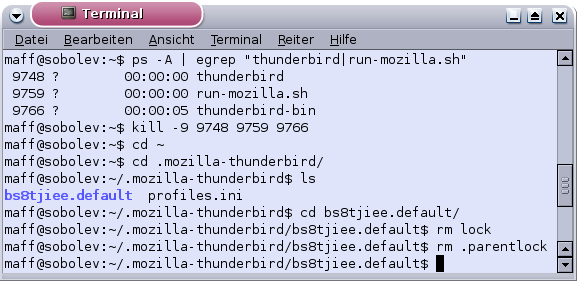
Example
Please note that the process numbers 9748, 9759 and 9766 appearing here will be different for you, as will the directory name, which here is bs8tjiee.default.